From HubSpot deal to Xero payslip line, to the penny
Commit reads deals from HubSpot, applies the plan you built into each rep's target, and turns the result into an approved, audited line in Xero Payroll. This page walks it in the order you'll meet it.
Read-only access to the deals that pay
Sign in to HubSpot from Commit and approve six read scopes. Nothing is ever written back. Deal changes arrive by webhook, with a full sync every 30 minutes as a backstop, and you choose which pipelines, stages, owners, teams and deal types count. Google Sheets works too, for teams who are not on HubSpot yet.
Full HubSpot detail →| Object | What Commit does with it | Access |
|---|---|---|
| Deals | Amount, stage, pipeline, close date, deal type, owner | READ |
| Owners | So each deal is credited to the right rep | READ |
| Companies and contacts | Context on the deal; never changed | READ |
| Portal currency | Picked up when you connect, so amounts are read correctly | READ |
| Deleted deals | Noticed, and the commission is reversed | READ |
| Write back | Commit has no permission to create, edit or delete anything | — NEVER |
The plan lives in the target, not in a formula
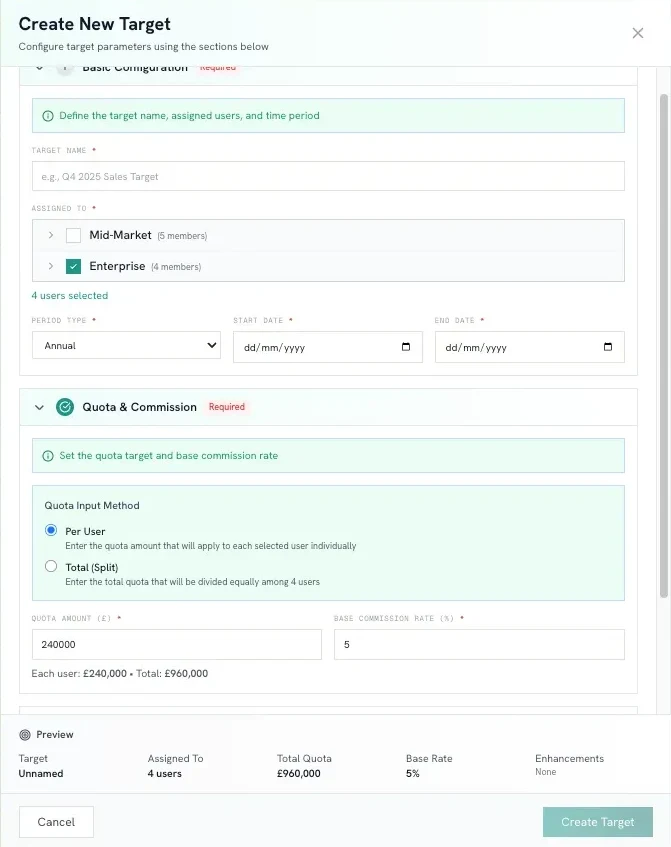
Each target carries its own commission plan: a base rate, accelerator tiers that step up on the margin or re-rate the whole period, decelerators below plan, gates that must be met before anything pays, and splits where a deal is shared. Targets run monthly, quarterly or annually, can be scoped to a product, distributed evenly, seasonally or by hand, and pro-rate for a mid-year hire.
- Base rate
- One percentage, per target
- Accelerators
- Marginal or whole-period
- Decelerators
- A lower rate below plan
- Gates
- Conditions before anything pays
- Splits
- Share a deal between reps
- Periods
- Monthly · quarterly · annual
- Scope
- Individual · team · product
- Distribution
- Even · seasonal · custom · pro-rated
Every deal change recalculates the statement
When a deal moves, closes, changes amount or is deleted in HubSpot, the affected rep's commission is recalculated and the change is written as a row. A deal that disappears reverses its commission. A clawback is a negative row with a reason attached, never an edit to history.
- Trigger
- Amount · stage · close date · owner · deletion
- Reversal
- Automatic when the deal goes
- Clawback
- Negative row, reason required
- Currency
- 15 currencies, manual FX with effective dates
| Deal | Amount | Rate | Commission |
|---|---|---|---|
| Northgate Ltd · new business | £148,000.00 | 8% | £11,840.00 |
| Harbour & Co · expansion | £96,500.00 | 8% | £7,720.00 |
| Pelham Group · new business | £212,000.00 | 8% | £16,960.00 |
| Westway Retail · new business (in progress) | £107,500.00 | 8% | £8,600.00 |
| Clawback · Harbour & Co cancelled in month 2REASON REQUIRED · POSTED AS A NEW ROW, HISTORY UNTOUCHED | −£96,500.00 | 8% | −£7,720.00 |
| Net attainment 78% · total due | £37,400.00 | ||
| When | What happened | Basis | Commission |
|---|---|---|---|
| 14 Oct · 14:02 | Deal closed won in HubSpot | £188,000 under quota × 8% | £15,040.00 |
| 14 Oct · 14:02 | Accelerator, above quota | £24,000 over quota × 12% | £2,880.00 |
| 14 Oct · 14:11 | Approved by manager | No adjustment | — |
| 02 Nov · 09:30 | Clawback · deal amount cut to £150,000 | £24,000 × 12% + £38,000 × 8% reversed · reason: contract revised at signature | −£5,920.00 |
| Net commission on this deal | £12,000.00 | ||
A number a rep can trust, and a manager can act on
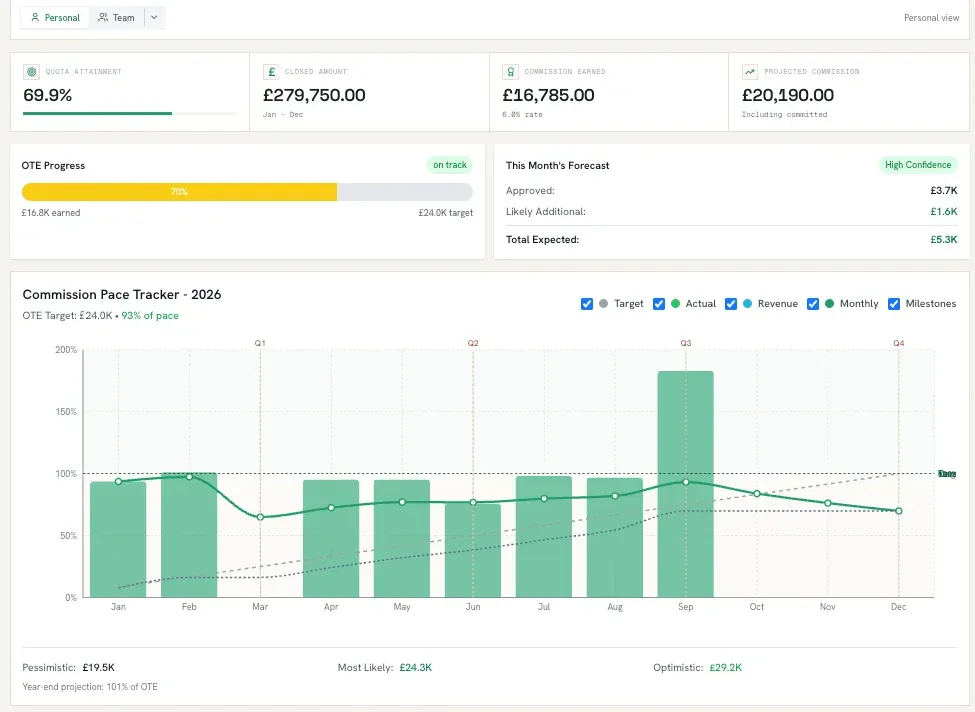
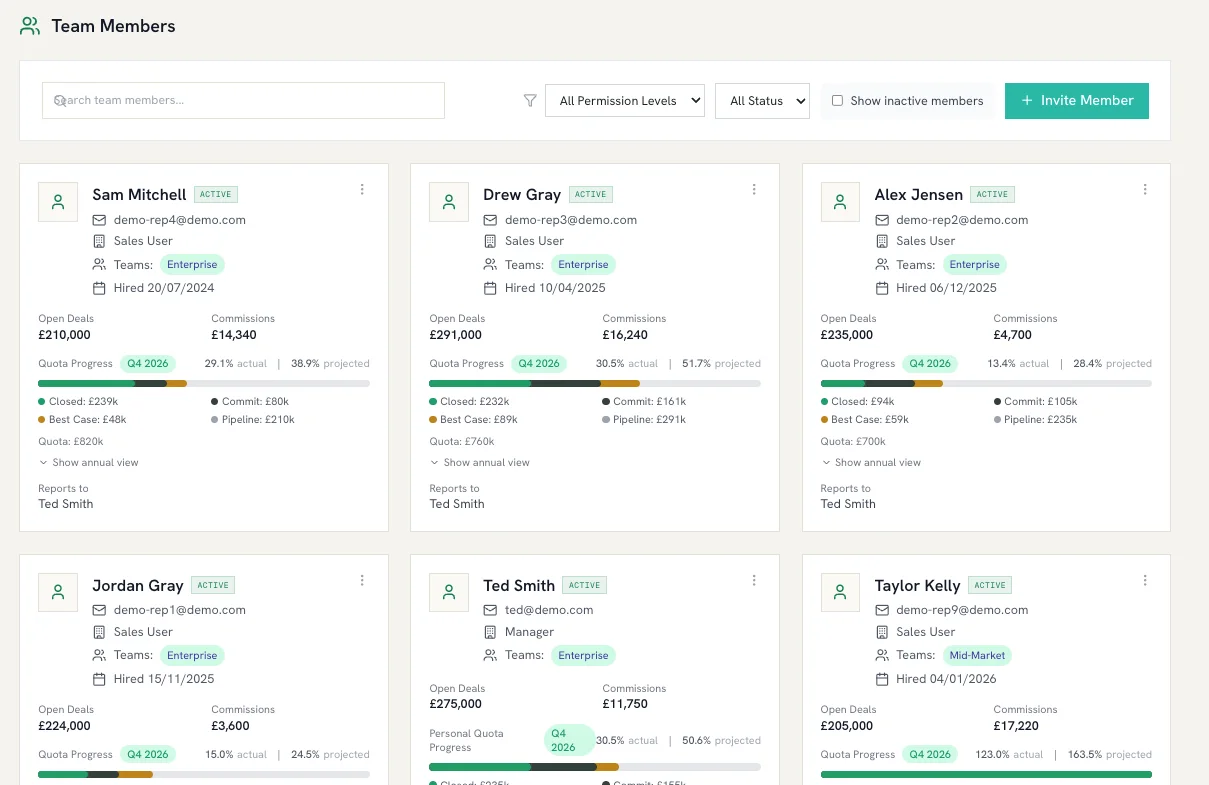
Reps get attainment, projected commission, pace against OTE and three scenarios: conservative, likely and optimistic, with twelve months of history. They move deals across Pipeline, Commit, Best Case and Closed Won on a board. Managers see the team, where forecasts are being sandbagged, and deals that closed without commission attached.
Four states, one audit log, no edits in the dark
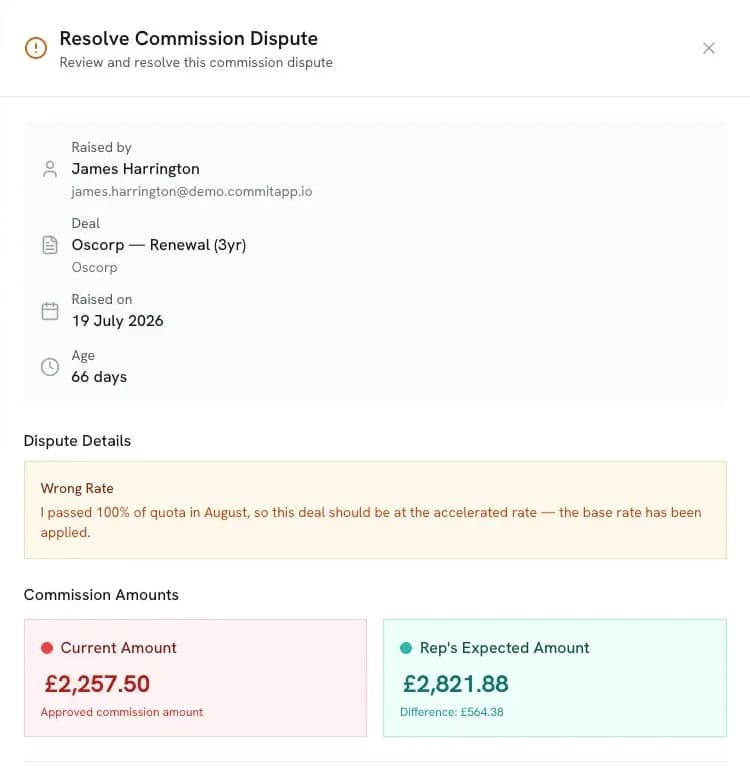
Commission moves from calculated to pending to approved or rejected, then paid. Managers approve one at a time or in bulk, adjust with a reason, and every action lands in the audit log. A rep who disagrees raises a dispute; a manager who is not that rep resolves it.
One line per employee, in the file Xero already imports
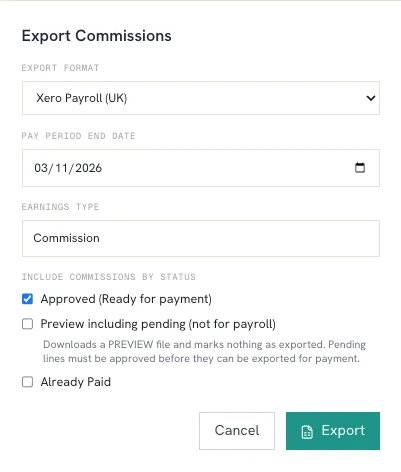
Approved commission exports as a Xero UK Payroll CSV with one earnings line per employee, as Xero bills, or as a detailed CSV with every row behind the total. A commission cannot be exported twice. Export history shows what went out, when and by whom. This is a file export, not a live Xero connection.
- Formats
- Xero Payroll · Xero bills · detailed CSV
- Guard
- No double export
- History
- What, when, who
- Fiscal year
- Set your start month; GBP by default
| Employee | Earnings type | Pay period end | Amount |
|---|---|---|---|
| E0412 | Commission | 2026-10-31 | £21,406.30 |
| E0397 | Commission | 2026-10-31 | £12,980.00 |
| E0421 | Commission | 2026-10-31 | £6,820.00 |
One earnings line per employee. A commission that has been exported cannot be exported again.
Admin, manager, rep. London, encrypted, yours
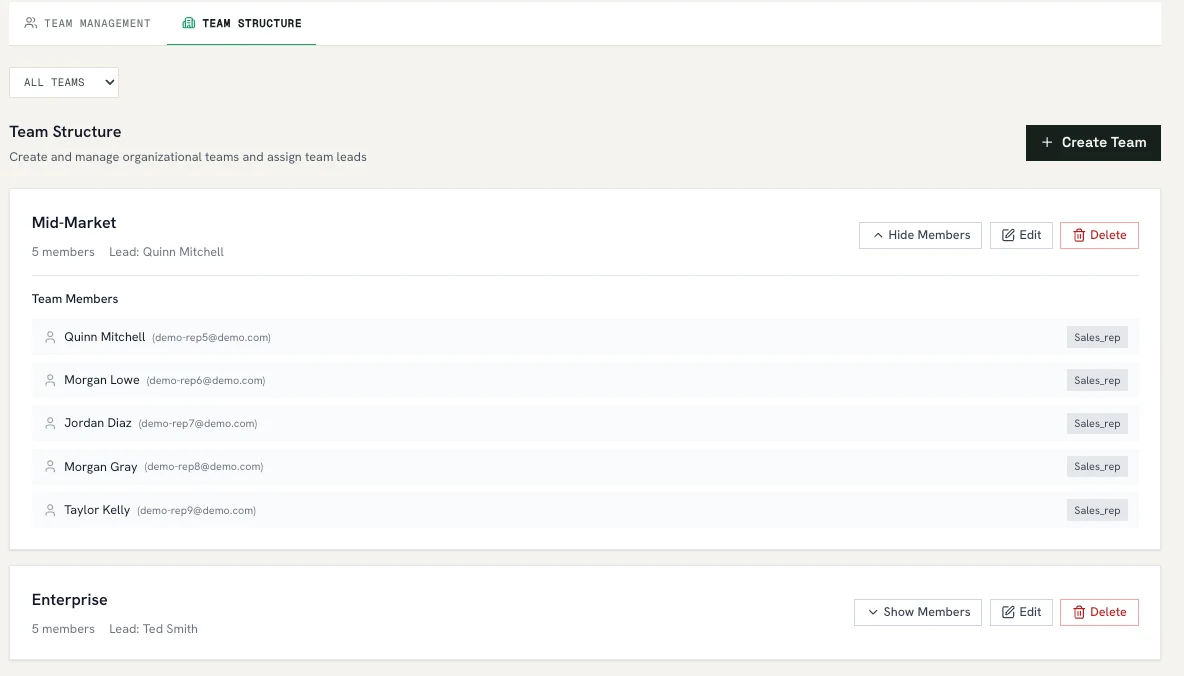
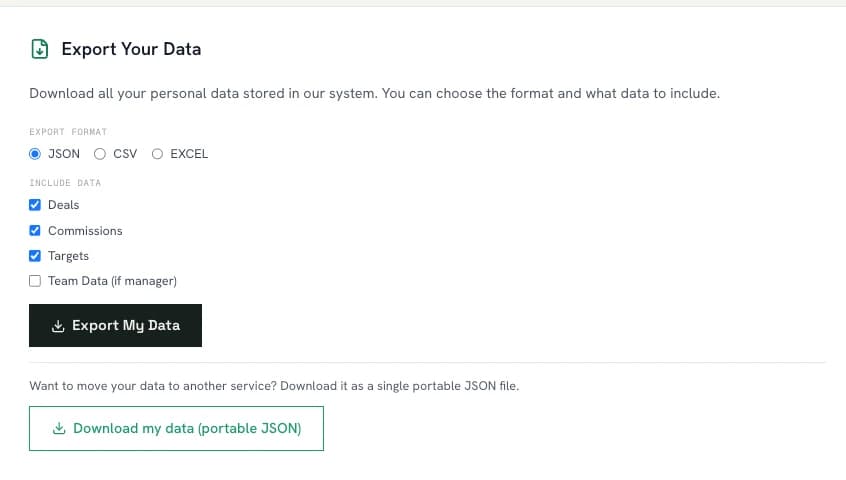
Three roles. Invite by link or let colleagues join by email domain. Guided onboarding walks a new account through connecting HubSpot, setting targets and inviting the team. Data sits in Supabase's London region with row-level security; OAuth tokens are encrypted; you can export or delete everything under GDPR.
- Region
- eu-west-2 · London
- Access
- Row-level security on every table
- Tokens
- Encrypted at rest
- GDPR
- Export · delete
- Notifications
- In-app and email
- Build plans and targets
- Connect HubSpot and Sheets
- Invite and manage users
- Export to payroll
- See the team's numbers
- Approve, reject, adjust
- Resolve disputes
- Categorise team deals
- Own dashboard and board
- See every rate applied
- Raise a dispute
- Never edits quota or rate
The honest list
- HubSpot, read-only. Six read scopes. Commit never writes back to your portal.
- Webhooks + 30-minute backstop. Deal changes arrive as they happen; a full sync every half hour catches anything missed.
- EU and US portals. Either HubSpot data centre.
- Deal filters. Choose pipelines, stages, owners, teams and deal types that count.
- Owner mapping. Each HubSpot owner is matched to a Commit user; unmapped owners are flagged.
- Google Sheets. A service-account sync with column mapping, for teams not on HubSpot yet.
- Base rate and tiers. Accelerator tiers applied marginally or to the whole period; decelerators below plan.
- Gates. Conditions that must be met before anything pays.
- Splits. Share a deal between reps.
- Monthly, quarterly, annual. Pick the evaluation period per target.
- Product-scoped targets. Different plans for different product lines.
- Quota distribution. Even, seasonal or custom, with pro-rating for mid-year hires.
- Individual and team targets. Assign to a rep, a team or both.
- Recalculates on every change. Amount, stage, close date, owner or deletion in HubSpot.
- Reversals. A deleted deal reverses its commission automatically.
- Clawbacks. A negative row with a required reason, never an edit to history.
- Multi-currency. Fifteen currencies with manual exchange rates and effective dates.
- UK fiscal year. Set your year start; GBP by default.
- Rep dashboard. Attainment, projected commission, pace against OTE, twelve months of history.
- Three scenarios. Conservative, likely and optimistic.
- Deals board. Pipeline, Commit, Best Case and Closed Won, by drag and drop.
- Manager view. Team attainment, sandbagging analytics, deals that closed without commission.
- Notifications. In-app and by email when commission moves.
- Four states. Calculated, pending, approved or rejected, paid.
- Bulk approval. Approve a period in one action, or one line at a time.
- Adjustments with a reason. Every change is logged with who, when and why.
- Disputes. A rep raises one; a manager who is not that rep resolves it.
- Audit trail. Every action on every commission, forever.
- Xero UK Payroll file. One earnings line per employee, in the format Xero imports.
- Xero bills and CSV. Accounts Payable bills, or a detailed CSV with every row behind the total.
- No double export. A commission can only be exported once.
- Export history. What went out, when and by whom.
- Admin, manager, rep. Three roles; reps never edit their own quota or rate.
- Invites and join requests. Invite by link, or let colleagues request to join by email domain.
- Guided onboarding. Set-up is walked through inside the product.
- London data residency. Database and auth in Supabase's eu-west-2 region.
- Row-level security. Deny-by-default on every table; OAuth tokens encrypted at rest.
- GDPR export and delete. Export your data or delete your account from Settings, at any time.
- Commission caps
- Salesforce or Pipedrive
- A live Xero API connection (export is by file)
- Single sign-on or two-factor authentication
- Account managers or implementation services
- Annual billing
If something you need is on this side, tell us before you trial: info@commitapp.io.
Run your plan on your deals
£10 per user per month. No minimum, no set-up fee, cancel any time. 14-day free trial, no credit card. Your data stays after the 14 days; subscribe when you are ready.